Have you ever wondered if your smartphone could truly rival a professional camera?
Use these apps to turn your phone into a professional camera, unlocking its full photographic potential.
Modern mobile devices boast incredible hardware, yet their default software often limits creative control.
This article will guide you through powerful tools that can transform your mobile photography experience.
The Power of Mobile Photography Tools
Mobile photography systems have evolved significantly over recent years, integrating advanced sensors and powerful computational techniques.
Many users, however, are unaware of the hidden capabilities their device possesses beyond simple point-and-shoot functions.
Third-party applications can tap into these deeper functionalities.
These specialized programs provide manual controls typically found only on DSLR or mirrorless equipment.
Therefore, you can precisely adjust settings like exposure, focus, and white balance directly from your device.
This level of control opens up a world of creative possibilities for photographers.
How Professional Imaging Software Works
Professional imaging software essentially bypasses the device’s standard automatic processing, granting users direct access to the camera hardware.
This allows for meticulous adjustments to capture images exactly as envisioned.
For instance, you can manually set the ISO, shutter speed, and aperture (if available).
Furthermore, many of these solutions support shooting in RAW format.
Unlike JPEGs, RAW files contain uncompressed image data, preserving maximum detail and dynamic range.
Consequently, this provides far greater flexibility during post-processing in editing software.
One excellent example is Halide Mark II, an iOS-exclusive application renowned for its intuitive interface and powerful features.
It offers a comprehensive suite of manual controls, including focus peaking, a detailed histogram, and various grid overlays.
Halide Mark II provides advanced computational tools like Smart RAW, which optimizes RAW files for better detail and less noise.
Main Differences: Stock vs. Pro Software
Control and Customization
The primary distinction lies in the level of control offered.
Stock camera software is designed for simplicity, hence they automate most settings to make photography accessible for everyone.
This often means sacrificing creative input.
Professional utilities, on the other hand, prioritize customization.
They empower you to fine-tune every aspect of your shot, from manual focus to precise white balance adjustments.
Consequently, photographers gain unparalleled creative freedom to achieve specific artistic visions.
Image Quality and File Formats
While stock programs typically output JPEGs, pro versions frequently offer RAW or DNG formats.
These uncompressed files retain significantly more image information.
As a result, they are ideal for serious photographers who intend to extensively edit their photos.
Additionally, some professional options integrate advanced noise reduction algorithms or multi-frame stacking, further enhancing image quality.
Therefore, even in challenging lighting conditions, these choices can produce superior results compared to standard options.
Risks or Limitations to Consider
Despite their power, these programs cannot overcome inherent hardware limitations of your device.
A smaller sensor or lens will still restrict ultimate image quality compared to dedicated photographic equipment.
Thus, managing expectations is crucial.
Moreover, using these applications often comes with a steeper learning curve.
Understanding concepts like ISO, shutter speed, and aperture is essential to effectively utilize manual controls.
Furthermore, continuous use of advanced features can drain your device’s battery quite rapidly.
Alternatives or Better Options
Besides Halide Mark II, several other powerful applications are available for both iOS and Android users.
ProCam 8, Moment Pro Camera, and FiLMiC Pro (for video) are highly regarded alternatives.
These offerings also provide extensive manual controls and RAW capture capabilities.
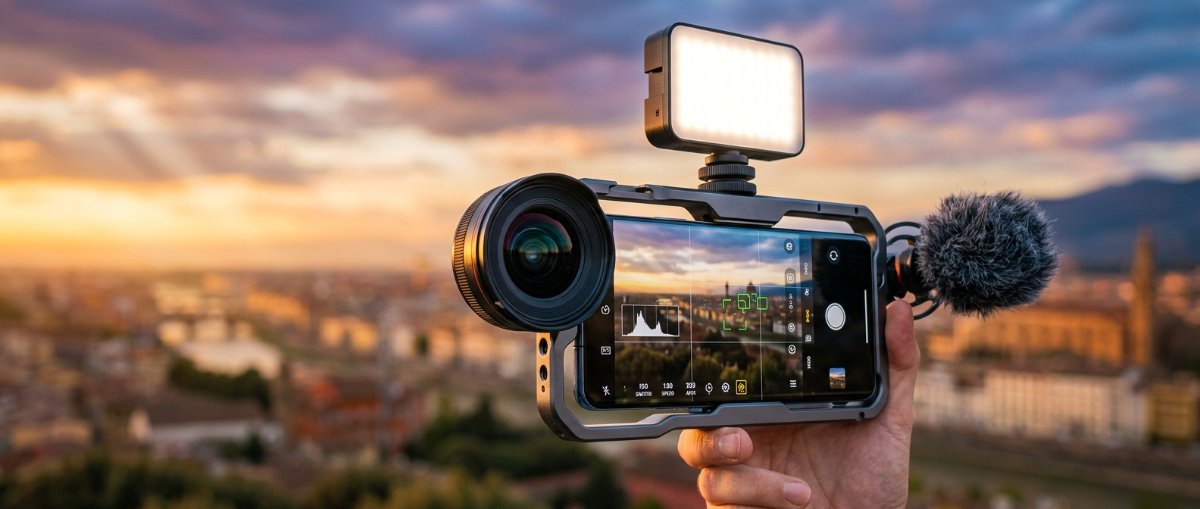
For those seeking to further enhance their mobile photography, external lenses and accessories present another option.
Clip-on lenses, tripod mounts, and even external flashes can significantly expand your device’s versatility.
Indeed, combining these with a professional camera application creates a formidable mobile setup.
How to Choose the Best Option for You
Selecting the right tool depends heavily on your specific needs and skill level.
Consider what kind of photography you primarily engage in and how much manual control you desire.
Some programs are more user-friendly for beginners, while others cater to seasoned pros.
- User Interface: Look for software with an intuitive layout that makes sense to you.
- Features: Do you need RAW, focus peaking, or specific video controls?
- Platform: Ensure the solution is available for your device (iOS or Android).
- Cost: Many pro versions are paid, but offer a one-time purchase for full features.
Transforming your smartphone into a professional camera is entirely within reach with the right software and a little practice.
By embracing manual controls and understanding advanced features, you can elevate your mobile photography significantly.
Use these apps to turn your phone into a professional camera
Transforming your smartphone into a professional camera is entirely within reach with the right software and a little practice.
Explore these powerful utilities and unlock a new dimension of creative expression on your device.